Works
iPhone videos in High Efficiency
They save as HEVC .mov. Our app to remove text from video read and cleaned that format.
ON IPHONE AND ANDROID
Skip the download: this app to remove text from video runs in Safari or Chrome, with a free 30-second preview.
Nothing to installiPhone HEVC testedFirst 10 seconds free
BEFORE YOU DOWNLOAD ANYTHING
An app to remove text from video erases burned-in words and fills in what was behind them. Store apps and this browser tool trade different things.
| Question | Why it matters | This app to remove text from video |
|---|---|---|
| Do you paint over the text? | Brushing a moving clip takes long | No. Words are found in each frame |
| Can you see it before paying? | Some apps charge first | Yes. 10 seconds at 480p, no watermark |
| Is the paid video watermarked? | A new mark defeats the point | No |
| Does the sound survive? | Exports can drop audio | Yes. Original audio copied |
| Does the video leave your phone? | On-device apps keep files local | Yes. Uploaded, deleted 24 hours after the job |
| How long can the clip be? | Long 4K clips are big files | 3 minutes, 500 MB, MP4 or MOV |
A REAL IPHONE-FORMAT TEST
We gave the app to remove text from video a vertical HEVC .mov with sound, the format iPhones save by default.


Tested by the Remove Text From Video team · Last updated November 15, 2026
IPHONE OR ANDROID
Safari or Chrome opens the app to remove text from video. No account until you preview.
Pick the clip from Photos, your gallery, or Files.
Watch 10 seconds free, then save the full MP4 to your phone.
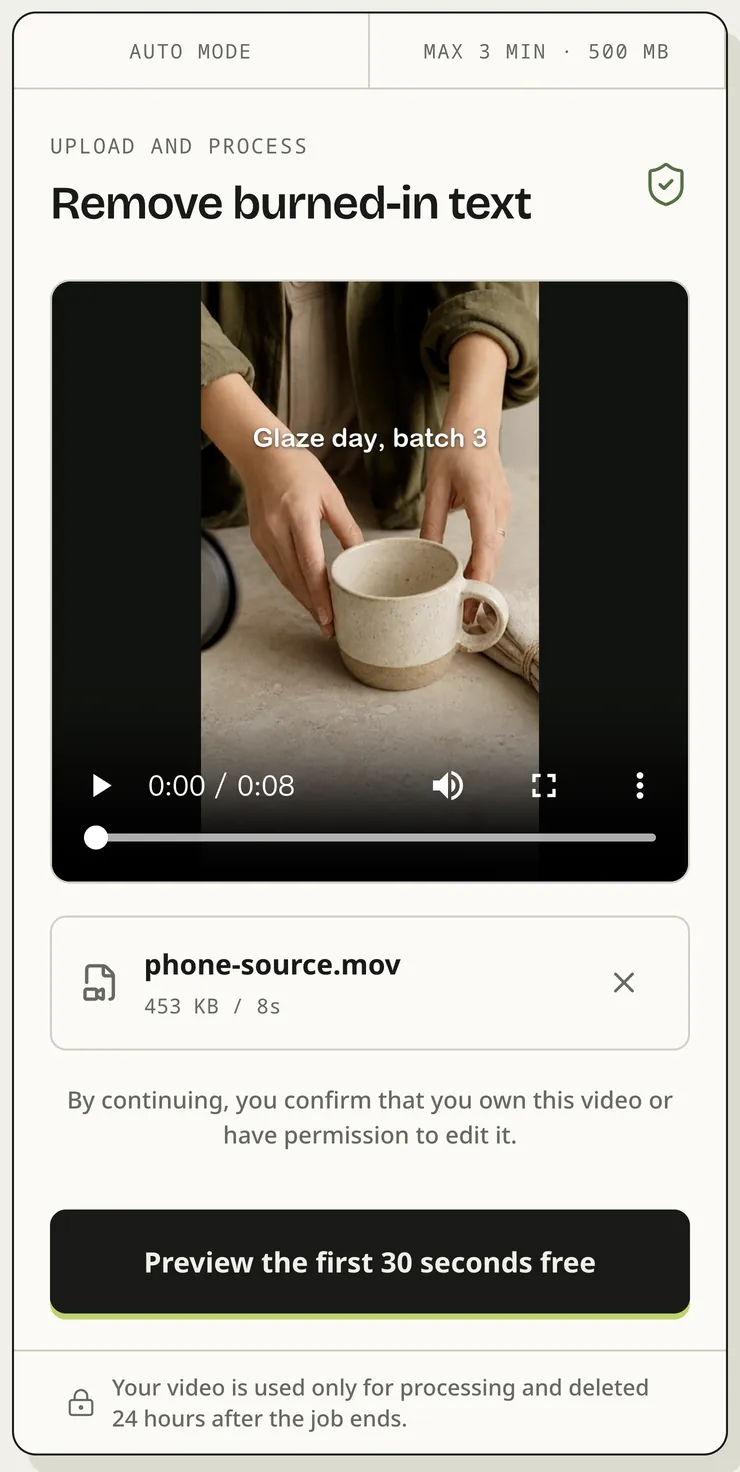
The real upload box at phone width with our HEVC clip picked. The app to remove text from video shows size and length before upload, so you know the cost. Add it to your home screen from the browser menu.
PHONE FILES
Most trouble with an app to remove text from video on a phone comes from file size, not the text.
Works
They save as HEVC .mov. Our app to remove text from video read and cleaned that format.
Check size
These can pass 500 MB in a little over a minute. Trim in Photos first.
Trim first
Cut the part with text. You pay per second, so shorter costs less.
Check closely
In our test the wrist under the title looked a touch softer when paused.
Reposting a short? See how to remove text from TikTok video clips you made.
Saved a Reel to your camera roll? Learn how to remove text from Instagram video before you post it again.
Old camcorder clip on your phone? Learn how to remove timestamp from video footage.
On a laptop instead? The main remove text from video page has the same tool.
BEFORE YOU UPLOAD
This app to remove text from video works on our servers, so the clip leaves your phone. Use a connection you trust.
Clips sent to the app to remove text from video are stored privately and deleted 24 hours after the job ends.
One credit per second, shown before you confirm. Failed jobs release credits.
Use the app to remove text from video on clips you may edit, never to strip someone else’s watermark.
PHONE QUESTIONS
You can try this one free. Upload from your phone and the first 10 seconds come back as a 480p preview with no watermark. Using the app to remove text from video on a full clip costs 1 credit per second.
Open this page in Safari, tap Choose a video, and pick the clip from Photos or Files. In our test this app to remove text from video handled the HEVC .mov format iPhones save by default.
Yes. Open it in Chrome, tap Choose a video, and pick a clip from your gallery. The app to remove text from video takes MP4 and MOV up to 3 minutes and 500 MB.
No. The work runs on our servers, so the browser only uploads the clip and plays the result. Add the page to your home screen to open it like an installed app.
Yes. Our HEVC .mov test clip played in the app to remove text from video, its length was read, and the text came off. The download is H.264, a larger file.
Yes. When the app to remove text from video finishes, the original audio track is copied into the MP4. Our 8-second test clip kept its sound.
TRY IT ON YOUR PHONE
Open the app to remove text from video on your phone and judge the first 10 seconds before you spend anything.