Removed
Typewriter on a see-through bar
Text and the dark bar both went. The cleanest way to remove text from Instagram video of the four.
REELS TEXT CLEANUP
Upload a Reel you made and we remove text from Instagram video frames automatically, Neon and Typewriter included, with 10 seconds free.
First 10 seconds free4 text styles testedWorks in a phone browser
APP LAYER OR VIDEO PICTURE?
Before you remove text from Instagram video, check the layer. Some Reels text sits on top of the video and some is part of it. Only the second kind needs a tool to remove text from Instagram video.
| Where you see the text | Layer | How to get rid of it |
|---|---|---|
| Caption or description over a Reel you are watching | App layer | Tap it to collapse it. Nothing is in the video file. |
| Auto captions on Instagram or Facebook Reels | App layer | Turn captions off in the app settings. To remove captions from Instagram reel files you saved, upload them. |
| Text on a draft or a Reels template you are editing | Still editable | Tap the text and delete or replace it before you share. |
| Text on a Reel you posted or saved to your camera roll | Video picture | It is burned in. Upload the file to remove text from Instagram video here. |
FOUR STYLES, ONE REEL
Neon, Typewriter, Classic and Strong look different on screen and come off differently. We stacked all four on one 9:16 clip and tried to remove text from Instagram video frames in one pass.


Tested by the Remove Text From Video team · Last updated November 16, 2026
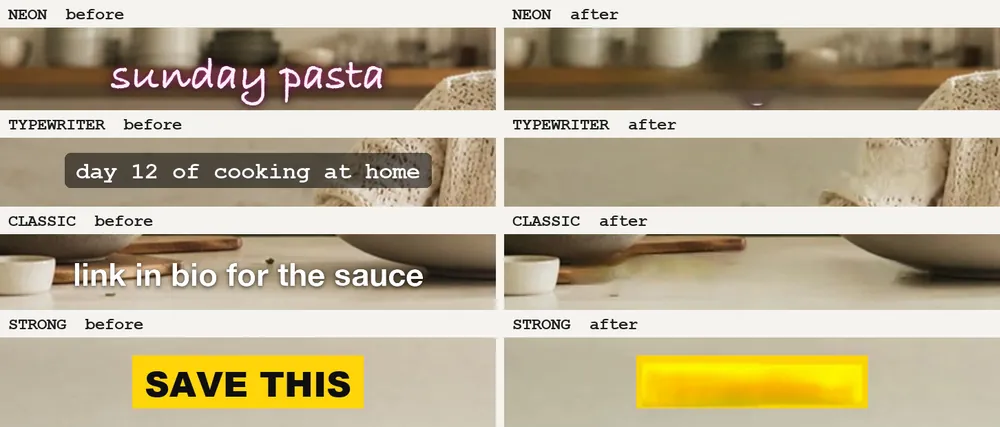
Each style up close. Pick a style without a solid box if you want to remove text from Instagram reel clips later.
Removed
Text and the dark bar both went. The cleanest way to remove text from Instagram video of the four.
Removed
Both lines came off, the new one at 4 s included. We remove text from Instagram video like this well; a small smudge stayed on the counter.
Removed, check
Letters and glow went. A tiny pink dot and a softer shelf edge stayed where the tail of the y was.
Words only
The words were removed but the yellow box stayed as a blurred bar. To remove text from Instagram video with Strong, post a version without the box.
FROM CAMERA ROLL TO NEW REEL
To remove text from Instagram video cleanly, use the original clip from your camera roll, or save your own Reel to your phone.
MP4 or MOV up to 3 minutes and 500 MB. No account needed to remove text from Instagram video in a free preview.
Pay to remove text from Instagram video in full, about $6 to $7.50 a minute, then add new text in Instagram.
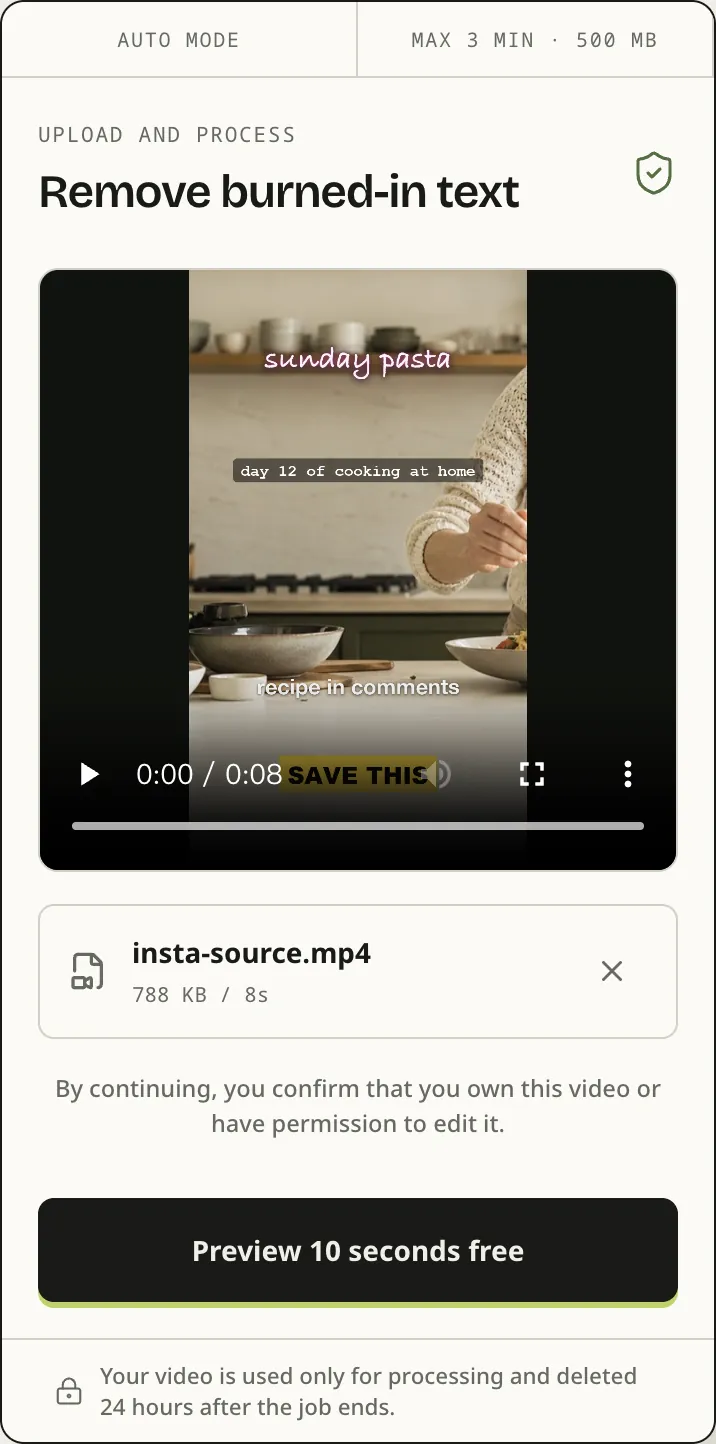
The upload box at phone width with our test Reel loaded. You can remove text from Instagram video right in Safari or Chrome.
Posting the same clip on TikTok? Learn how to remove text from TikTok video hook lines.
Lyrics on a music Reel? See how to remove lyrics from video.
Want it to feel like an app? Use the app to remove text from video from your home screen, or the main remove text from video page on a laptop.
BEFORE YOU REPOST
Remove text from Instagram video you made or may edit. Reels saved from other accounts are not yours to repost.
We remove text from Instagram video frames, not watermarks. Platform logos on downloaded clips stay.
Clips are stored privately and deleted 24 hours after the job ends.
To remove text from Instagram video that runs 30 seconds takes 30 credits, shown before you confirm.
INSTAGRAM QUESTIONS
Instagram does not let you edit text on a posted Reel. Upload the original from your camera roll, or save your own Reel to your phone, and we remove text from Instagram video frames automatically. Then post the clean copy.
That text is the caption or auto captions, drawn by the app on top of the video. Tap the caption to collapse it, or turn captions off in the app settings. There is nothing to upload.
While you edit, tap the template text and replace or delete it. If you already saved the Reel with the text, it is part of the picture, and you can remove text from Instagram video like that here.
You can try it free: the first 10 seconds come back as a 480p preview with no watermark. To remove text from Instagram video in full costs 1 credit per second, about $6 to $7.50 a minute.
When we tried to remove text from Instagram video in four styles, Typewriter, Classic and Neon came off. Strong text on a solid color box lost its words but the box stayed.
No. We remove text from Instagram video frames, not platform logos or watermarks. Use your own original file, not a download of someone else’s Reel.
TEST YOUR OWN REEL
Upload a Reel, remove text from Instagram video previews free for 10 seconds, and pay only if the rest is worth it.